
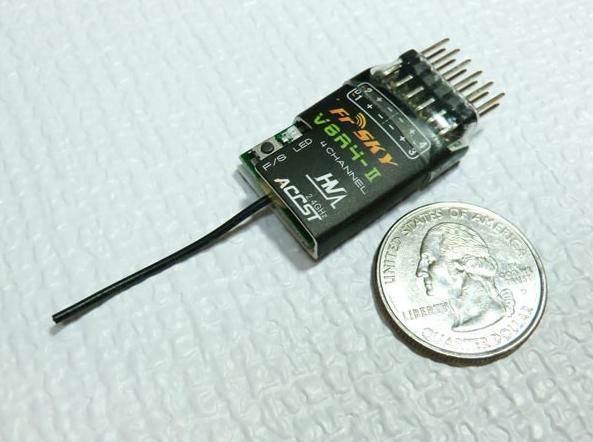
Odbiornik FrSky 2.4GHz V8R4-II HV 4 kanałowy
 (0)
0
(0)
0
-
WysyłkaProdukt jest w naszym sklepie. Wysyłka termin poniżej
-
W sklepieIlość produktu w naszym sklepie1 szt.
-
Dostawa od:Minimalny koszt dostawy 1 szt. tego produktu.
Paczkomaty: 16,90 złKurier DHL: od 17.90 zł16,90 zł
-
Bezpłatna dostawa dotyczy przesyłek DHL i Paczkomaty od 399zł. Nie dotyczy płyt piankowych i balsy
Darmowa dostawa od 399 zł
-
Zakupione w sklepie internetowym produkty można zwrócić w terminie 30 dni od doręczenia bez podawania przyczyny.
30 dni
na zwrot lub wymianę -
Zaufało nam > 15 tys. Klientów
- 100% Klientów poleca F3M w Google Opinie Konsumenckie Zakupy Bardzo Dobre 4,9(5)
- Oferujemy oryginalne wysokiej jakości produkty najlepszych firm z gwarancją producenta lub dystrybutora
- Współpracujemy z portalem Przelewy24 - bezpieczne i szybkie płatności online
- Dane osobowe są odpowiedno zabezpieczone podczas przesyłania certyfikatem SSL
Bezpieczne
zakupy
Szczegóły produktu
Popularny 4 kanałowy odbiornik V8R4-II HV firmy FrSky. Współpracuje ze wszystkimi modułami nadawczymi FrSky. Waży tylko 3,5g. Zasilanie 3-16V. Zasięg powyżej 1km.
1.1 Compatibility
| FrSky modules | How to put V8R4-II into binding mode respectively |
| V8FT, V8JT, V8HT | V8_Mode (Non-telemetry) Connect battery to V8R4-II while holding the F/S button on V8R4-II |
| DFT, DJT, DHT, DHT-U in V8_Mode (Switch 1 OFF and Switch 2 ON) | |
| DFT, DJT, DHT, DHT-U in D_Mode (Switch 1 OFF and Switch 2 OFF) | D_Mode (Telemetry) Connect Ch1 & Ch2 signal pins of V8R4-II by provided jumper and then connect battery to V8R4-II directly (no need to hold the F/S button on V8R4-II) |
1.2 Specifications
Dimensions: 36*17.5*8mm
Weight: 3.5g / 2.7g (naked)
Operating Voltage Range: 3.0~16.0V (HV version)
Operating Current: 30mA
Specified Range: >1km
1.3 New feature of V8R4-II over V8R4
1) Compatible with all FrSky modules (V8_mode & D_mode), receive only (V8R4-II can talk with module of either mode, but it does not send telemetry information back to the transmitter).
2) Wider and higher voltage range (V8R4-II: 3.0~16.0V, V8R4: 3.2~7.6V)
3) Longer specified range (V8R4-II: >1km, V8R4: ≥500m)
| Note: Voltage out equals to voltage in. Be sure that when using battery or regulated output from ESC, the capacity must meet the usage conditions of servos. |
2. Set Up
2.1 Bind procedure
1) Turn on your transmitter and switch it to PPM mode. Turn the transmitter off.
2) Turn on the transmitter while holding the F/S button on the transmitter module. Release the button. The RED LED on the transmitter module will flash (and the beeper will sound when the transmitter module is in D_Mode), indicating the transmitter is ready to bind to the receiver.
3) Put V8R4-II into binding mode (see 1.1 Compatibility chart for details), the LED on V8R4-II will flash, indicating the binding process is completed.
4) Turn off both the transmitter and V8R4-II (and disconnect the jumper from V8R4-II after binding with telemetry module in D_Mode).
5) Turn on the transmitter and connect the battery to V8R4-II, The GREEN LED on the receiver will blink, indicating the receiver is receiving commands.
The transmitter module/receiver binding will not have to be repeated, unless one of the two is replaced.
2.2 Range check
A pre-flight range check should be done before each flying session. Reflections from nearby metal fences, concrete building or trees can cause loss of signal both during range check and during the flight.
The following steps are to be followed to perform the range check of the model before the flight:
1) Place the model at least 60cm (two feet) above non-metal contaminated ground (e.g. on a wooden bench).
2) The receiver antennas should be separated in the model, and do not touch the ground.
3) Place the antenna of the transmitter in a vertical position.
4) Turn on the transmitter and the receiver, press the F/S button of the transmitter module for 4 seconds to enter range check mode, the RED LED of the transmitter module will be off, GREEN LED will flash rapidly. The effective distance will be decreased to 1/30 of full range.
5) Walk away from the model while simultaneously operating the controls on the transmitter, confirming that all controls operate normally to a distance of at least 30 meters (~30 yds).
6) Press the F/S button of the transmitter module for 1S-4S to exit range check mode, RED LED will be back on, indicating normal operation is back.
2.3 Failsafe setting
Failsafe is a useful feature in which all controls move to a preset position whenever the control signal is lost for a period of time. V8R4-II supports failsafe function for all channels.
Follow the steps below to set failsafe positions for each channel:
1) Bind the receiver first and turn on both the transmitter and the receiver;
2) Move the controls to the desired failsafe position for all channels;
3) Press briefly the F/S button on the receiver (less than 1 second). The GREEN LED of the receiver will flash twice, indicating the failsafe position has been set in the receiver.
To disable the failsafe function, just re-bind the receiver.
| Failsafe is recommended to set when system is firstly used, or receiver has been re-bound. Follow steps below to set failsafe. Option-1. How to set failsafe to a user-determined state on lost signal: 1) Bind the receiver to the transmitter module first and turn on both the transmitter and the receiver; 2) Move the controls to desired failsafe position for all channels; 3) Press briefly the F/S button on the receiver and you are done.
Option-2. How to set failsafe for no pulses on lost signal: 1) Just press briefly the F/S button on the receiver while the transmitter is off and you are done. Note: If failsafe is not set, failsafe default will hold last position before signal is lost. In this case, there exists risk that your model will fly away or cause injury. |
